

Introduction
The Rastriya Parichaya Patra (National Identity Card / NID) is a biometric digital identity issued by the Department of National ID and Civil Registration (DoNIDCR) under the Ministry of Home Affairs. It consolidates an individual’s personal and biometric details into a single 10 digit National Identity Number (NIN). NID registration has become mandatory for key transactions, including applying for a passport, opening bank accounts, renewing driver’s licenses, and accessing social security benefits.
This blog contains information about how to apply for NID in Nepal and the necessary information regarding to NID National Identity Card.
Who Can Apply & Age Group Requirements
Nepali Citizens Aged 16 and Above: Any citizen who holds a valid Nepali Citizenship Certificate is eligible to apply for the primary Rastriya Parichaya Patra.
Minors Under 16: Under recent regulatory updates, minors can obtain a Nabalik Parichaya Patra (Minor Identity Card) linked to a parent’s NIN, though the full biometric NID card requires reaching age 16.
Mandatory Prerequisites: Applicants must possess an original Nepali Citizenship Certificate. If details (such as date of birth or marriage status) are incomplete on the citizenship card, supporting documents like a birth certificate, marriage certificate, or migration certificate (Basai-Sarai) are required.
Where to Apply for Your National ID (NID) in Nepal ?
-
Local Level: Your respective District Administration Office (DAO) or designated area centers.
-
Kathmandu Station: Narayanhiti NID Department (open to residents of all 77 districts—no home-district visit required).
What are the Documents needed to apply for National ID in Nepal?
These are the documents required to apply for National ID in Nepal.
- Original Citizenship Card .
- Original Migration Certificate if Migrated to New place.
- Original Marriage Certificate if Married.
How to apply National ID ( NID ) in Nepal?
Follow this optimized 3-step NID application guide to complete your online pre-enrollment and get your National Identity Number (NIN).
Step 1: Book Your Online Pre-Enrollment Appointment
Step 2: Complete Biometric Verification at the Enrollment Center
Step 3: Receive Your National Identity Number (NIN)
Step 1: Book Your Online Pre-Enrollment Appointment
Visit the DoNIDCR portal, select Login for Individual, and enter your mobile number to log in via OTP. Click New Enrollment and complete your personal, contact, and family details exactly as they appear on your citizenship certificate.
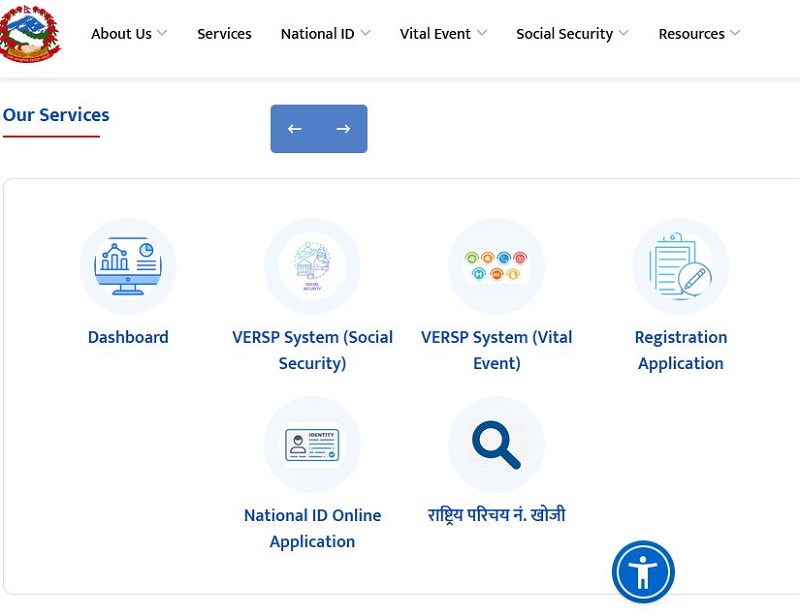
Registration portal will be activated. Click on Login for individuals.
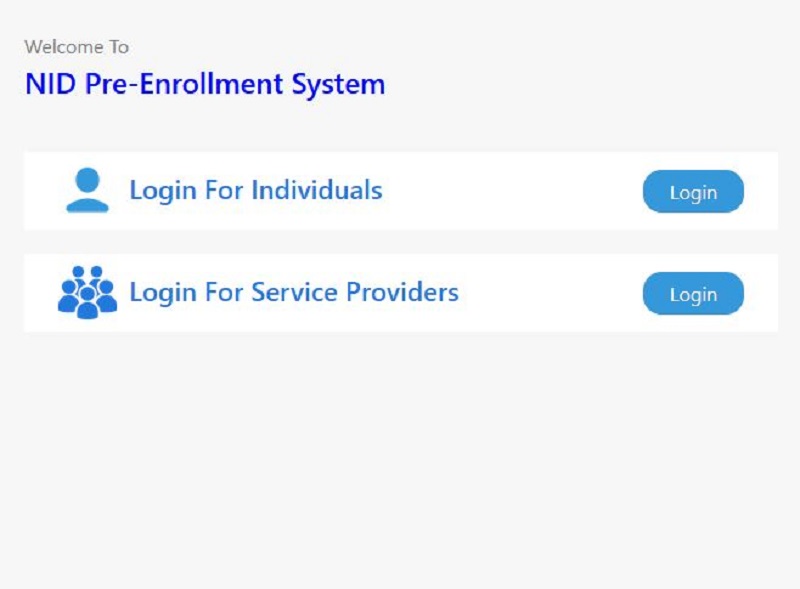

Enter your mobile Number and click on next button. You will shortly get an otp number in your sms , enter your otp number . You will automatically redirected to dashboard page.

After entering your otp now you will be logged into National ID dashboard where you will manage applicants records. Click on New Enrollment to proceed further.

A pop up box displays some guidelines before starting filling up your National ID online form. it’s mandatory to use NEPALI UNICODE ROMANIZED in fields.

After closing pop up dialogue box, Applicant data interface will be open. Here you will start filling your NID online Form in Nepal.

Enter Main Applicant Data , Applicant information and proceed to Next button.

Contact detail menu will appear here enter your Permanent address and Temporary address in New format of your address after fedralism was established in Nepal. Then proceed to next button.

Enter your Father’s , Mother’s , Grandfather’s and Grandmother’s detail along with their address and proceed to Next menu.
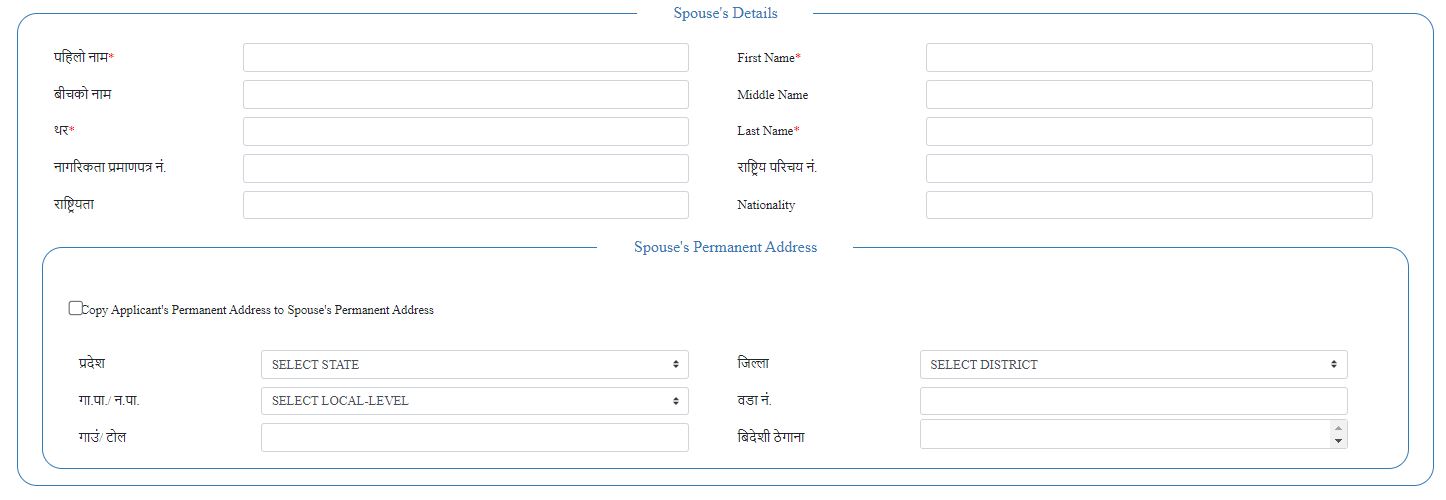
you will be forwarded to appointment menu after submitting your Family Details.

Book Appointment & Select Location
Choose your preferred biometric enrollment center (such as the Narayanhiti NID Department for any district, or your local District Administration Office) along with a convenient date and time slot.

Submit and Print applicaiton form.
Review your details, submit the form, and print the generated pre-enrollment token/appointment slip featuring your application number.
Step 2: Complete Biometric Verification at the Enrollment Center
Visit your chosen center on your appointment date. Bring your printed application slip and original citizenship certificate. Staff will capture your photograph, fingerprints, iris scan, and digital signature.
Step 3: Receive Your National Identity Number (NIN)
Get your NIN number instantly after your biometric process. You will receive your NID card in few months. You will be notified to collect your Card after printed.
How much time it takes to process for National ID in Nepal?
You will get an option for choosing the available dates while applying your Online Form . It usually takes few days to get your appointment to apply for National ID in Nepal. After your appointment is completed you can get National Id Number (NIN) a confirmation paper but not the printed card. In order to get printed card you need to wait few month. Without card you can use NIN to process your services provided by Nepal Government.
How much it Costs to apply for National ID in Nepal?
Applying for National ID is free of cost in Nepal but if you are not able to apply your online appoionment online services or Cyber will charge your some payment.

National ID Number (NIN) is missing in my paper.
To find your missing National ID number go to your mobile sms aap and type <S><SPACE><NID Submission Number> and send to 30001. You will shortly get an sms about missing National id number.
How do i check my National ID is printed or Not?
Getting your National ID card usally may take few months but how to know your card is ready to collect ? It’s simple , you can visit website and search status by entering your NIN or Submission number of National ID. To know the status of your National ID visit https://citizenportal.donidcr.gov.np/en

You will redirected to Department of National ID and Civil Registration website. Click on National id card status option displayed in the Website to proceed further.

Enter Request Number or National Identity Number, Enter Captcha and click on Search button.

dialouge box will appear with the Details of your National ID Card which has been printed or not.
Conclusion
Applying for your National ID in Nepal is a smooth and straightforward process. By securing an online appointment and visiting your local District Administration Office—or utilizing services like Saral Online Sewa for your online pre-enrollment—you can get your application sorted without hassle.
We hope this guide made the process clearer for you. Have a great day, and good luck with your application!


0 Comments